Linux Bash

Providing immersive and explanatory content in a simple way anybody can understand.

  • Posted on
    Featured Image
    Package managers are essential tools in modern operating systems (OS) that help automate the process of installing, updating, and removing software packages. These tools manage the software installed on a system, making it easier for users and administrators to keep their systems up-to-date with the latest versions of software. They provide a streamlined and efficient way to manage dependencies, handle software updates, and ensure system stability by preventing compatibility issues.
  • Posted on
    Featured Image
    The terms Bash and SH refer to two different types of shell environments used in Linux and other Unix-like operating systems. While they both serve the purpose of interacting with the system through command-line interfaces (CLI), they have notable differences in terms of features, compatibility, and functionality. SH (Bourne Shell): The Bourne shell, commonly referred to as sh, was developed by Stephen Bourne at AT&T Bell Labs in the 1970s. It became the standard shell for Unix systems, providing basic functionalities such as file manipulation, variable management, and scripting. Its design focused on simplicity and portability, making it a versatile tool for system administrators and users alike.
  • Posted on
    Featured Image
    Let's explore each of the programming languages and their interpreters in detail. We'll look into the context in which they're used, who typically uses them, what they are used for, and the power they offer. Additionally, I'll suggest starting points for testing each language, and provide an explanation of their benefits and popularity. Context & Usage: Who uses it: System administrators, DevOps engineers, and developers working in Linux or Unix-like environments. What for: Bash is the default shell for Unix-like systems. It’s used for writing scripts to automate tasks, managing system processes, manipulating files, and running system commands.
  • Posted on
    Featured Image
    If you're looking to dive deep into Bash and become proficient with Linux command-line tools, here are three highly regarded books that are both informative and widely acclaimed: The Linux Command Line: A Complete Introduction by William E. Shotts, Jr. Why it’s great: This book is a fantastic starting point for beginners who want to understand the basics of Linux and the command line. It covers Bash fundamentals, command syntax, file system navigation, and more. Shotts takes a clear, approachable, and comprehensive approach, gradually building up your skills. Key Features: Clear explanations of common command-line tools and Bash concepts. Emphasis on hands-on practice with examples and exercises.
  • Posted on
    Featured Image
    5 Fun Things You Can Do With Linux Bash
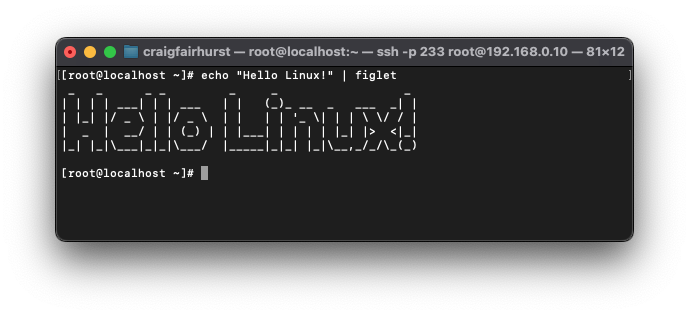
    Linux Bash (Bourne Again Shell) is incredibly versatile and fun to use. Here are 10 enjoyable things you can do with it. Use PS1 to create a custom, colorful prompt that displays the current time, username, directory, or even emojis. export PS1="\[\e[1;32m\]\u@\h:\[\e[1;34m\]\w\[\e[0m\]$ " Play Retro Games Install and play classic terminal-based games like nethack, moon-buggy, or bsdgames. Use tools like toilet, figlet, or cowsay to create text-based art. echo "Hello Linux!" | figlet Create Random Passwords Generate secure passwords using /dev/urandom or Bash functions. tr -dc 'A-Za-z0-9' < /dev/urandom | head -c 16 Use curl to fetch weather data from APIs like wttr.in. curl wttr.
  • Posted on
    Featured Image
    Processes In Linux
    A computer doing more than one thing at a time is using processes, these require resources, CPU time, memory and access to other devices like CD/DVD/USB drives, etc. Each process is allocated an amount of system resources to perform its function which is controlled by the operating system whose job it is to facilitate these processes. Signals have an important part to play on the interaction of the processes, usually these send exit signals and other information to each other, or to itself. Programs, Processes, and Threads A program is a set of instructions to be carried out which may local data such as information for output to the terminal via read or external data which may come from a database.
  • Posted on
    Featured Image
    After reading this document you should be able to identify why Linux defines its filesystem hierarchy in one big tree and explain the role of the filesystem hierarchy standard, explain what is available at boot in the root directory (/), explain each subdirectory purpose and typical contents. The aim here is to be able to create a working bash script which knows where to put its different data stores including lockfiles, database(s) or temporary files; including the script itself. One Big Filesystem As with all Linux installations there is a set protocol to follow which could be looked at as one big tree starting from its root, /.
  • Posted on
    Featured Image
    When it happens that your VPS is eating data by the second and there is disk read/write issues one port of call you are bound to visit is searching and identifying large files on your system. Now, you would have been forgiven for thinking this is a complicated procedure considering some Linux Bash solutions for fairly simple things, but no. Linux Bash wins again! du -sh /path/to/folder/* | sort -rh Here, du is getting the sizes and sort is organising them, -h is telling du to display human-readable format. The output should be something like this: 2.3T /path/to/directory 1.8T /path/to/other It does take a while to organise as it is being done recursively however given 3-5mins and most scenarios will be fine.
  • Posted on
    Featured Image
    So yeah, getting used to Bash is about finding the right way to do things. However, learning one-liners and picking up information here and there is all very useful, finding something you don't need to Google in order to recall is extremely important. Take the case of recursive find and replace. We've all been there, it needs to be done frequently but you're either a) scared or b) forgetful. Then you use the same snippet from a web resource again and again and eventually make a serious error and boom, simplicity is now lost on you! So here it is, something you can remember so that you don't use different methods depending on what Google throws up today. grep -Rl newertext .
  • Posted on
    Featured Image
    In a modern world where cyber-warfare is common place and every-day users are targets from organised crime, it goes without saying that you are likely to run into problems rather quickly if you don't use every available means of security. The scope of this article is to connect via SSH Keys however you should also be doing some other more mundane tasks like encrypting the connection (preferably with a VPN on your router) and using altered ports, plus limiting access to SSH users, if you have them. So what is the safest way to connect to your remote Linux OS distribution, by command line? Well quite simply, it is done with SSH Keys which you generate so that the connection can be established.
  • Posted on
    Featured Image
    Linux Bash (Bourne Again Shell) is the default command-line interface for most Linux distributions and macOS. For new users, it might feel overwhelming at first, but once you understand the basics, Bash can become a powerful tool for managing your system, automating tasks, and improving productivity. In this quick guide, we’ll walk you through the essentials of Bash in under 30 minutes. Whether you're a beginner or just looking to refresh your knowledge, this guide will help you feel comfortable with the Linux command line. Bash is a command-line interpreter that allows users to interact with their operating system by entering text-based commands. It's a shell program that interprets and runs commands, scripts, and system operations.
  • Posted on
    Featured Image
    Linux is an open-source Operating System which is released with different flavours (or distros) under the guise of free-to-use software. Anybody can download and run Linux free-of-charge and with no restraints on the end-user; you could release, distribute and profit from Linux with relative ease with no worry of associated cost or licensing infringement. It is fair to say Linux has formidably and profoundly revolutionised and defined the process of interacting with electronic devices. You can find Linux in cars, refrigerators, televisions and of course, as a desktop-grade or headless operating system. Once you become accustomed to Linux, you quickly see just why all the top 500 supercomputers all run Linux.
  • Posted on
    Featured Image
    If you’ve ever used a Linux operating system used on most Virtual Private Servers, you may have heard of bash. It’s a Unix shell that reads and executes various commands. Bash, short for Bourne-Again Shell, is a Unix shell and a command language interpreter. It reads shell commands and interacts with the operating system to execute them. Why Use Bash Scripts? Bash scripts can help with your workflow as they compile many lengthy commands into a single executable script file. For example, if you have multiple commands that you have to run at a specific time interval, you can compile a bash script instead of typing out the commands manually one by one. You then execute the script directly, when it’s necessary.